Enter password to view case study
" height="18px" id="uuO70bzEX" width="16px"/></svg>)
Service NSW was building a new design system — TaPaaS — and rebuilding its entire transaction portfolio on top of it. The components and page templates were being created at the same time as the first transactions. If accessibility wasn’t embedded now, every service that followed would inherit the same gaps and require costly retrofitting later.
When the squad building the Notice of Disposal transaction started working with the new library, I was paired with them to embed accessibility from the start. Working closely with the squad’s PM — who shared the urgency — I used NoD as the reference case to define how every TaPaaS component and page template should behave for screen readers, keyboard navigation, and assistive technologies.
The result went far beyond one transaction. I annotated every component and page template in the TaPaaS library, created a repeatable guideline that designers and engineers could follow across all future transactions, and tested everything with VoiceOver and Microsoft Accessibility Insights. The guideline was adopted across multiple squads — making accessible design the default, not the afterthought.
The biggest takeaway:
Building the guideline to work at the page and flow level — rather than just the component level — was the most consequential design decision in the project. Accessibility can’t be fully specified on individual components in isolation, because the behaviour emerges from how components interact on a page and how pages connect across a flow. A heading structure, a focus sequence, a live region announcement — these only make sense in context. That understanding shaped every annotation I wrote and every rule in the guideline.
Role
Lead Product Designer — Accessibility
Team
Design squad, TaPaaS engineering squads across multiple transactions
Context
Service NSW, Transport for NSW, NSW Government
Scope
Full Notice of Disposal (NOD) flow + all TaPaaS library components and page templates
Status
All accessibility considerations in the NOD transaction have been finalized in production. Accessibility annotations for TaPaaS Design Library components and pages have been created. Accessibility guidelines—including audit instructions—have been published for all squads in the portfolio.
Service NSW was building TaPaaS — a new design system and component library — to standardise its digital transactions. The library provided strong visual consistency, but the accessible behaviour of its components wasn’t being documented alongside the visual specifications. Engineers had no clear guidance on how elements should behave with screen readers, how focus should be managed across multi-step forms, or how error states should be announced to assistive technology users.
At the same time, the squad responsible for the Notice of Disposal (NoD) transaction was among the first to build with the new library. This was a critical moment: if accessibility wasn’t defined now, while the design system and its first transactions were being built simultaneously, every future transaction would inherit the same gaps — and retrofitting accessibility after launch is always more expensive and disruptive than building it in from the start.
After conversations with the NoD squad’s PM — who recognised the risk and was eager to get this right — I was paired with the squad to embed accessibility directly into the build process. My accessibility background and previous audit work meant I could work at both levels: defining the right behaviour for the specific NoD flows and establishing the design system-level specifications that would scale to every transaction that followed.
I was paired with the NoD squad to help them build accessibly. But the real opportunity was bigger than one transaction.
Every new or redesigned Service NSW transaction — including Online Licence Renewal, which I was also working on — would be built from the same TaPaaS component library and page templates. If I only annotated NoD, we would be solving the same problems again for each subsequent transaction. But if I used NoD as the reference case to define accessibility specifications at the design system level, every transaction that followed would inherit correct accessible behaviour from the ground up.
Annotate one transaction and you fix one flow.
Build accessibility into the design system and you fix every transaction that follows.
This reframing changed the scope, the deliverables, and the impact of the work. Rather than a one-time annotation exercise, this became the accessibility foundation for the TaPaaS library going forward.
I structured the work across three layers, each feeding into the next.
1. Reference implementation — annotating the full NoD flow
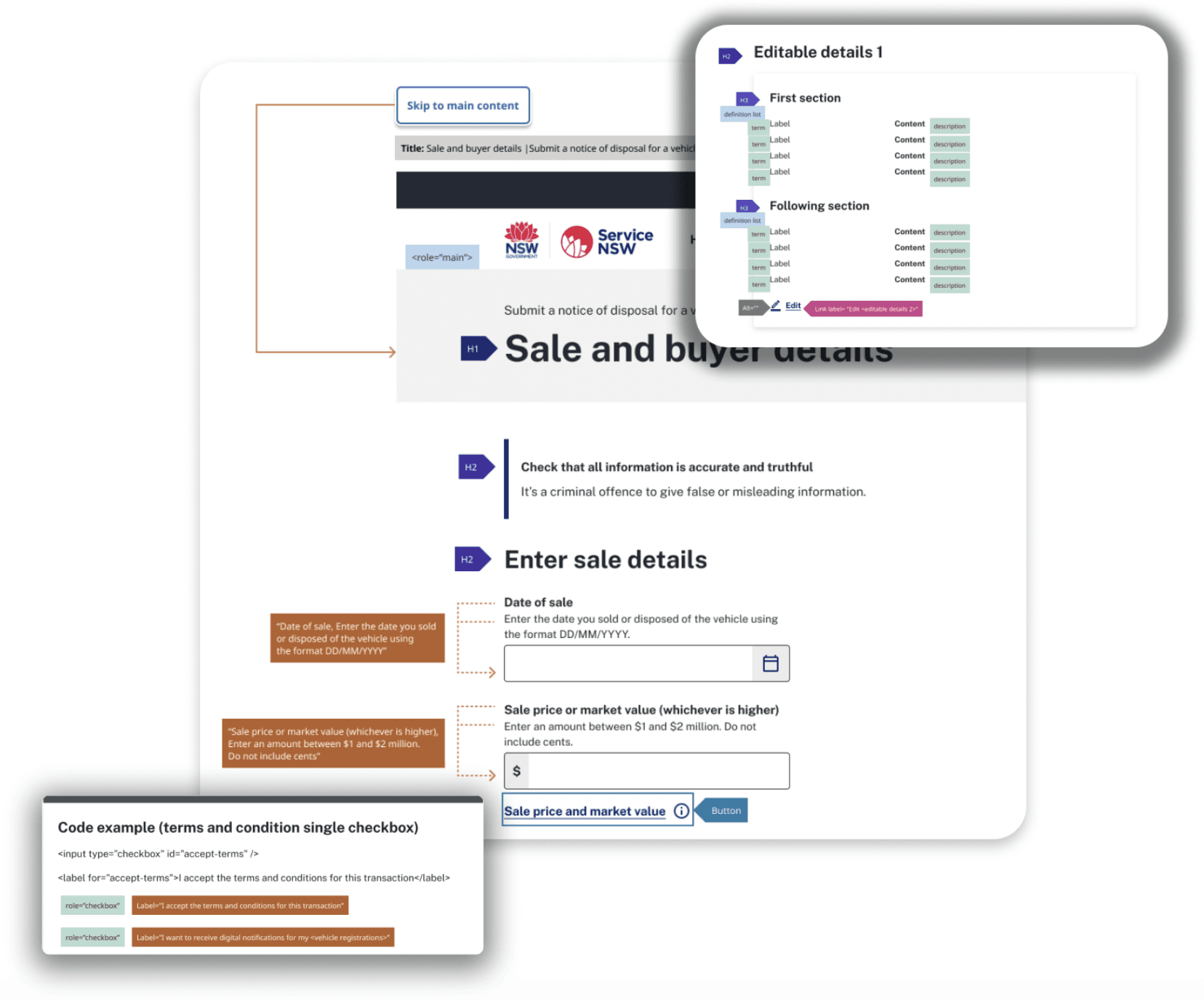
I annotated every page in the Notice of Disposal transaction end-to-end: Privacy, Input, Review, Declaration, Confirmation, and Error pages. For each page I documented the full accessibility specification: page title structure, heading hierarchy (H1 through H3), reading order, focus (tab) order, landmark regions, skip links, alt text for images and icons, form labels and accessible names, link vs button semantics, list structures, dynamic content and live region behaviour, component states, and autocomplete attributes.
This wasn’t annotation at the component level in isolation. A key principle I applied throughout was that accessibility works at the page and flow level, not just on individual elements. How a heading hierarchy connects across a multi-step form, how focus moves after an error is submitted, how a screen reader announces a dynamic search result — these behaviours can only be defined in context. The NoD annotation captured that context in full.
2. Design system library — annotating all TaPaaS components and page templates
In parallel, I worked through the TaPaaS component library and page templates, adding accessibility specifications at the component level. Each component got a specification covering: the expected screen reader announcement, keyboard interaction model, ARIA attributes required, focus behaviour, and any context-dependent rules (for example, when a component appears inside a form vs. standalone).
This meant that when designers and engineers picked up a TaPaaS component to build a new transaction, the accessible behaviour was already defined — no guesswork, no reinterpretation, no variation between teams.
3. Guideline and testing protocol — scaling the practice
The third layer was infrastructure: a repeatable guideline published in Confluence that any designer could use when annotating a new flow. The guideline covered a 14-point accessibility annotation checklist, a dedicated section on error message patterns (the area of highest inconsistency across existing flows), and a step-by-step VoiceOver testing protocol designers and engineers could run before IT3.
I designed the guideline to be usable by designers who were not accessibility specialists. The goal was to make correct annotation the path of least resistance — not something that required deep expertise to do reasonably well.
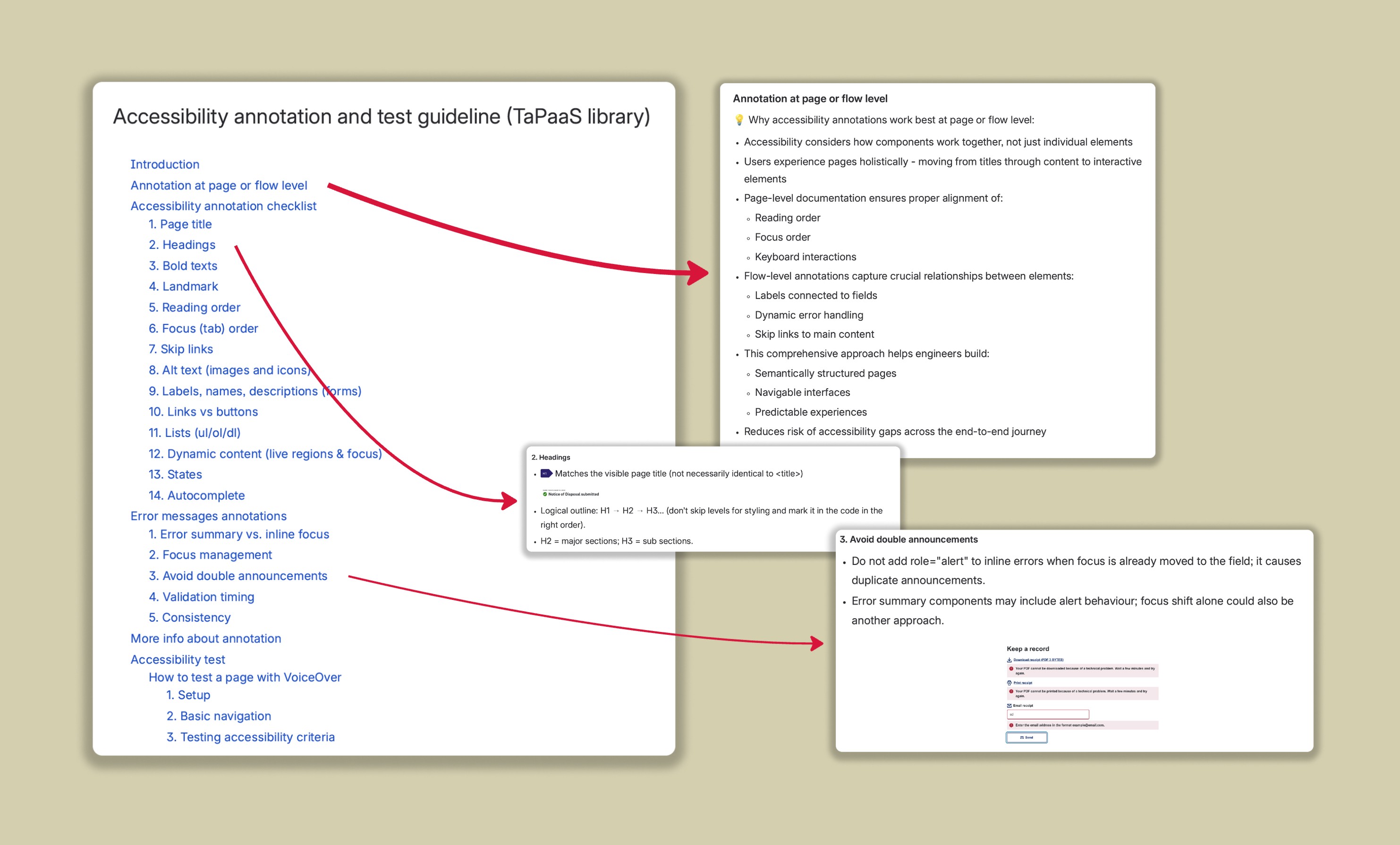
"Comprehensive accessibility guideline for annotation standards, checklist criteria, and testing procedures for the TaPaaS design library - documented in the Confluence"
Of all the accessibility behaviours to standardise, error handling proved the most complex — and the most consequential for assistive technology users.
Across the existing transaction flows, error states were implemented inconsistently. Some flows moved focus to an error summary at the top of the page; others moved focus directly to the problematic field; some added role="alert" to inline errors even when focus was already being moved — causing screen readers to announce the same error twice. For users navigating by keyboard or screen reader, this inconsistency wasn’t just frustrating; it was genuinely disorienting.
Resolving this required more than a design decision. I ran sessions with engineers and the design team to work through the behaviour in detail: when should focus move to an error summary vs. directly to the field? When does adding an alert role help vs. create double announcements? How should validation timing work to avoid announcing errors before users have finished interacting with a field?
The outcome of those sessions became the error messages annotation section of the guideline — five specific rules covering error summary vs. inline focus, focus management, avoiding double announcements, validation timing, and the importance of consistency across all pages in a flow. The principle we landed on was deliberate: consistency beats clever case-by-case solutions. Picking one pattern and applying it throughout a flow is better for users and simpler for engineers than optimising each page independently.
Annotation specifies intent. Testing verifies reality. I tested all annotated flows using two tools:
VoiceOver (Mac)
Verified headings, labels, skip links, links and buttons, focus order, images and icons, list semantics, component states, autocomplete, and error behaviours across all NoD pages. VoiceOver testing revealed gaps between annotation intent and actual implementation before they reached production.
Microsoft Accessibility Insights
Verified headings, labels, skip links, links and buttons, focus order, images and icons, list semantics, component states, autocomplete, and error behaviours across all NoD pages. VoiceOver testing revealed gaps between annotation intent and actual implementation before they reached production.
Key finding
Verified headings, labels, skip links, links and buttons, focus order, images and icons, list semantics, component states, autocomplete, and error behaviours across all NoD pages. VoiceOver testing revealed gaps between annotation intent and actual implementation before they reached production.
A full accessibility annotation of the Notice of Disposal flow covering all six page types — Privacy, Input, Review, Declaration, Confirmation, and Error — including all 14 annotation criteria and error state specifications.
Accessibility specifications for all TaPaaS components and page templates embedded into the design system library, making accessible behaviour the default starting point for every transaction built on TaPaaS going forward.
A repeatable accessibility annotation guideline published in Confluence: a 14-point checklist, error message annotation rules, and a step-by-step VoiceOver testing protocol. Adopted across multiple squads.
Error behaviour recommendations developed collaboratively with engineering and design, establishing a consistent pattern for error summary, focus management, and validation timing across all transaction flows.
A VoiceOver testing protocol that non-specialist designers and engineers could run independently, reducing reliance on accessibility experts for every QA cycle.
The adoption of the guideline across multiple squads meant the impact extended well beyond the Notice of Disposal transaction. Flows built after this work — including OLR, which I was also working on concurrently — used the annotation framework from the start, catching accessibility gaps in design rather than in production.
The most important shift I made on this project was refusing to treat it as a documentation task. Accessibility annotation is often positioned as a compliance step — something you do to satisfy an audit, then file away. The insight I brought was that annotation is actually a communication tool. It’s how designers tell engineers what they intended, and it’s how teams catch gaps before they become production problems.
Building the guideline to work at the page and flow level — rather than just the component level — was the most consequential design decision in the project. Accessibility can’t be fully specified on individual components in isolation, because the behaviour emerges from how components interact on a page and how pages connect across a flow. A heading structure, a focus sequence, a live region announcement — these only make sense in context. That understanding shaped every annotation I wrote and every rule in the guideline.
If I were doing this again, I would have pushed earlier to include user testing with actual screen reader users, not just designer-led VoiceOver testing. We verified that our implementations matched our specifications, but we had limited evidence of how real AT users experienced the resulting flows. For a government service used by people with disabilities, that gap matters and I would make the case for it more forcefully.
The broader lesson: accessibility at scale is an organisational design problem, not a design skill problem. You can’t make products accessible by having one person who cares about it deeply. You have to build the systems — the annotations, the guidelines, the shared language between design and engineering — that make accessible outcomes repeatable without requiring expertise at every step.
The biggest takeaway:
Building the guideline to work at the page and flow level — rather than just the component level — was the most consequential design decision in the project. Accessibility can’t be fully specified on individual components in isolation, because the behaviour emerges from how components interact on a page and how pages connect across a flow. A heading structure, a focus sequence, a live region announcement — these only make sense in context. That understanding shaped every annotation I wrote and every rule in the guideline.